Difference between revisions of "Parent Teacher Online(PTO)"
Jump to navigation
Jump to search
| Line 1: | Line 1: | ||
==Parent Teacher Online(PTO)== | ==Parent Teacher Online(PTO)== | ||
| − | #In the '''Cloudwork Dashboard'''>'''Single Sign On'''>''' | + | #In the '''Cloudwork Dashboard'''>'''Single Sign On'''>'''OpenID Connect'''>'''Add New Service''' |
#Enter the following details: | #Enter the following details: | ||
#:'''Name''' = '''Educonnex-PTO''' | #:'''Name''' = '''Educonnex-PTO''' | ||
Revision as of 06:46, 24 April 2025
Parent Teacher Online(PTO)
- In the Cloudwork Dashboard>Single Sign On>OpenID Connect>Add New Service
- Enter the following details:
- Name = Educonnex-PTO
- Client Type = Web Application
- Rediret URIs: https://loginhubdev.azurewebsites.net/cloudworklogincallback
https://loginhub.azurewebsites.net/cloudworklogincallback - Allow Grant Type = Leave checkbox unchecked
- Click Submit
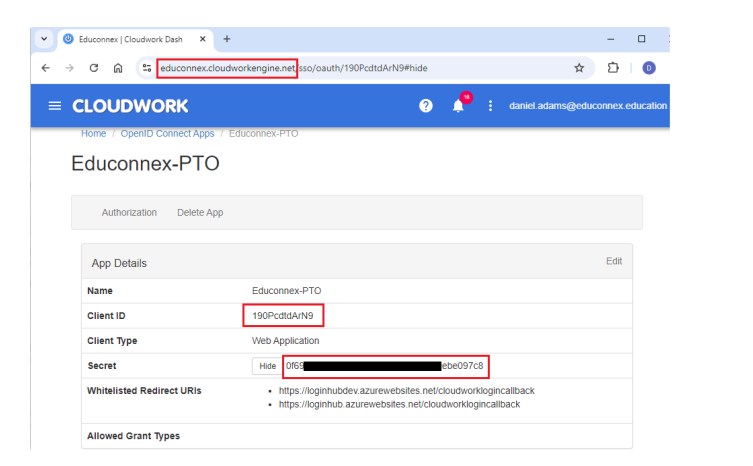
- After clicking submit, copy the following values from the redirected page:
- Client ID
- Secret
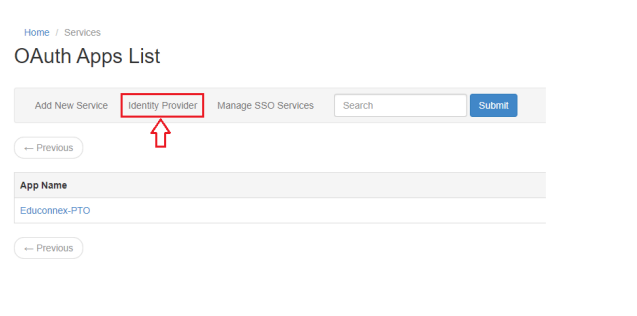
- Cloudwork Dashboard>Single Sign On>Manage OpenID Connect App>Identity Provider>OpenID Provider
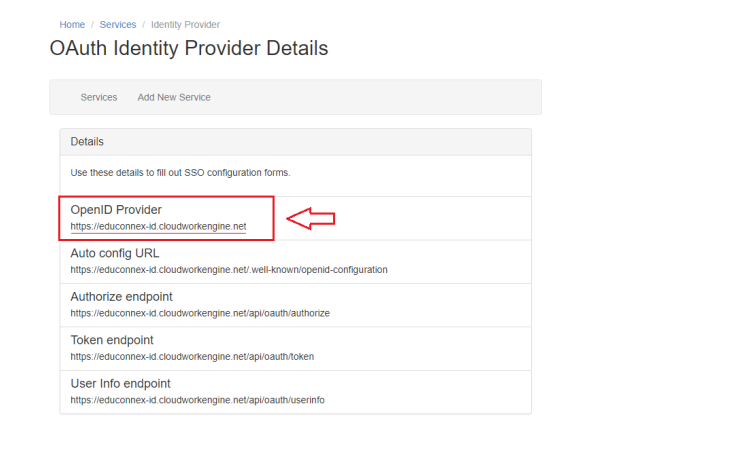
- Send the following 3 values from step 4 to PTO Support requesting PTO to complete at their end the SSO configuration between PTO and Cloudwork.
- Client ID
- Secret
- OpenID Provider


