Difference between revisions of "Wellio"
Jump to navigation
Jump to search
(Created page with "==Wellio== ===SSO Setup with Cloudwork=== #In the '''Cloudwork Dashboard'''>'''Single Sign On Services'''>'''Add New Service'''>'''Custom SAML Service''' #Enter into the field...") |
|||
| (One intermediate revision by the same user not shown) | |||
| Line 10: | Line 10: | ||
#Click Submit | #Click Submit | ||
#In the '''Cloudwork Dashboard'''>'''Single Sign On Services'''>SSO Service List>'''Wellio''' | #In the '''Cloudwork Dashboard'''>'''Single Sign On Services'''>SSO Service List>'''Wellio''' | ||
| − | #Under '''Attribute Map''' click Edit | + | #Under '''Attribute Map''' click '''Edit''' |
#Ensure the following attribute mapping exists | #Ensure the following attribute mapping exists | ||
| − | |||
#*'''email''' maps to '''email''' | #*'''email''' maps to '''email''' | ||
#*'''First Name''' maps to '''first_name''' | #*'''First Name''' maps to '''first_name''' | ||
Latest revision as of 01:32, 11 November 2025
Wellio
SSO Setup with Cloudwork
- In the Cloudwork Dashboard>Single Sign On Services>Add New Service>Custom SAML Service
- Enter into the fields
- Name = Wellio
- Entity ID: Wellio Dashboard>Settings>SSO
- Assertion Consumer Service: Wellio Dashboard>Settings>SSO
- NameID Value: Set to Email
- NameID Format: Change to urn:oasis:names:tc:SAML:1.1:nameid-format:emailAddress
- Click Submit
- In the Cloudwork Dashboard>Single Sign On Services>SSO Service List>Wellio
- Under Attribute Map click Edit
- Ensure the following attribute mapping exists
- email maps to email
- First Name maps to first_name
- Last Name maps to last_name
- click submit
SSO Setup with Wellio
- In the Cloudwork Dashboard>Single Sign On Services>Identity Provider
- Under XML file click Download
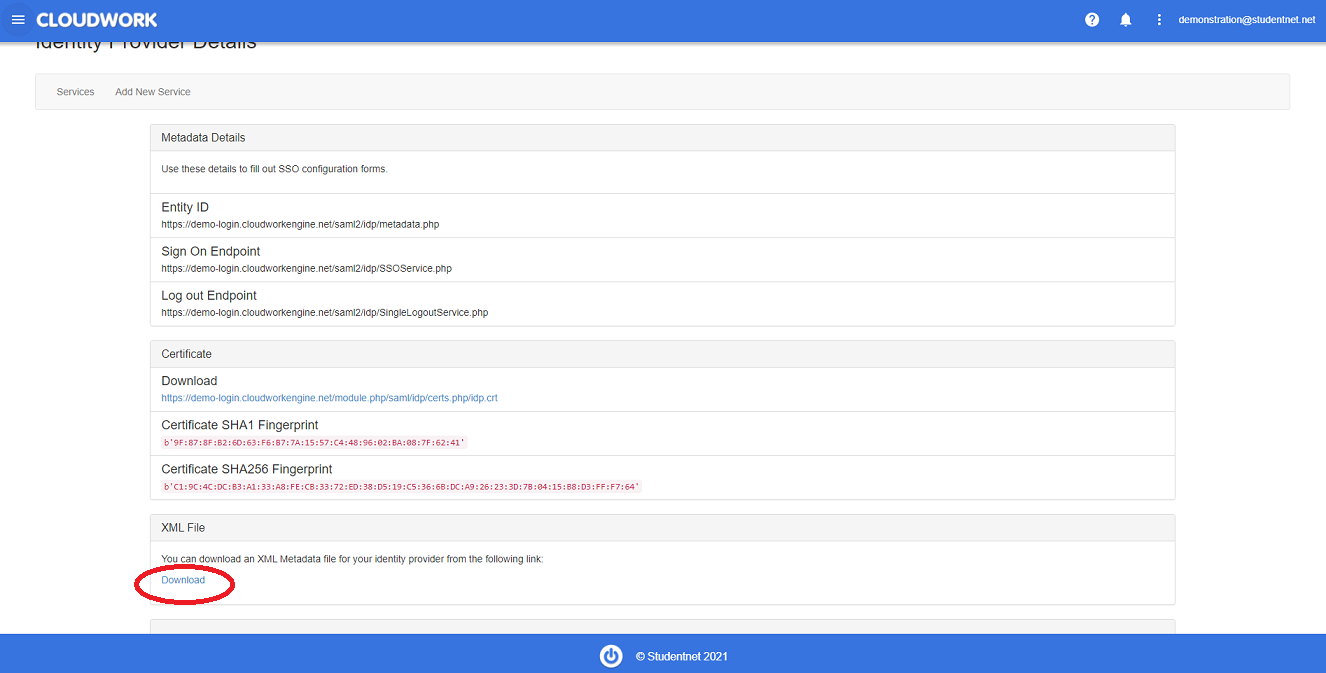 Location of XML File Download
 - In the Wellio SSO setup page, upload the XML file from step 2
- In the User Attributes and Claims>Required claim set the following values
- Name Identifier format = Email address
- Source = select Attribute
- Source Attribute = user.mail
- Under Additional Claims enter the following Claims:
- email maps to user.mail
- first_name maps to user.givenname
- last_name maps to user.surname
- Delete the value inside each Namespace field
- Set Assignment required? to No in the Properties tab
- To verify the SSO setup, provide credentials for the following:
- Teacher Test Account: Email & password
- Student Test Account: Email & password

