Difference between revisions of "Parent Teacher Online(PTO)"
Jump to navigation
Jump to search
(Created page with "==Parent Teacher Online(PTO)== #In the '''Cloudwork Dashboard'''>'''Single Sign On'''>'''Manage OpenID Connect App'''>'''Add New Service''' #Enter the following details: #:'''...") |
(No difference)
|
Revision as of 07:08, 4 September 2024
Parent Teacher Online(PTO)
- In the Cloudwork Dashboard>Single Sign On>Manage OpenID Connect App>Add New Service
- Enter the following details:
- Name = Educonnex-PTO
- Client Type = Web Application
- Rediret URIs: https://loginhubdev.azurewebsites.net/cloudworklogincallback
https://loginhub.azurewebsites.net/cloudworklogincallback - Allow Grant Type = Leave checkbox unchecked
- Click Submit
- Copy the following values:
- Client ID
- Secret
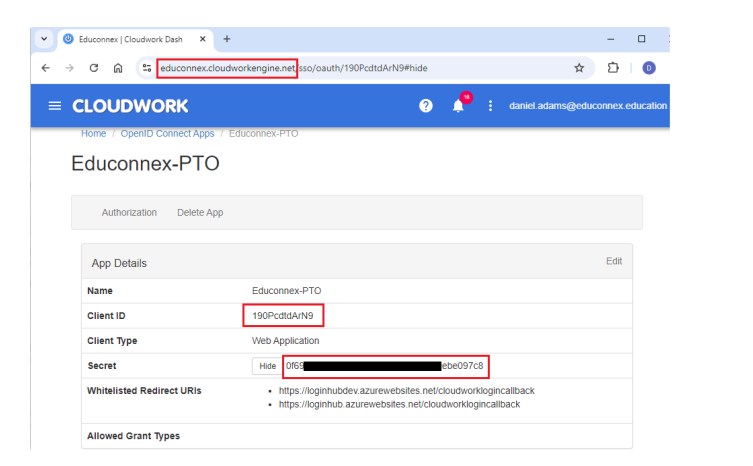
- Cloudwork Dashboard>Single Sign On>Manage OpenID Connect App>Identity Provider>OpenID Provider
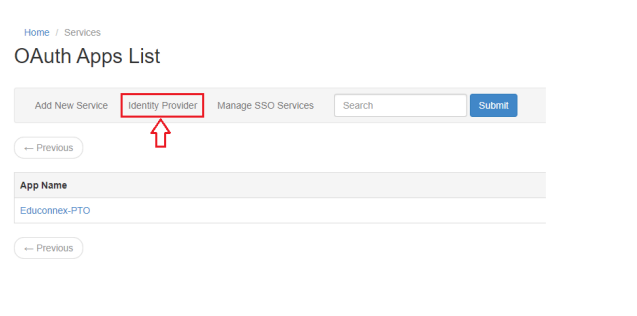
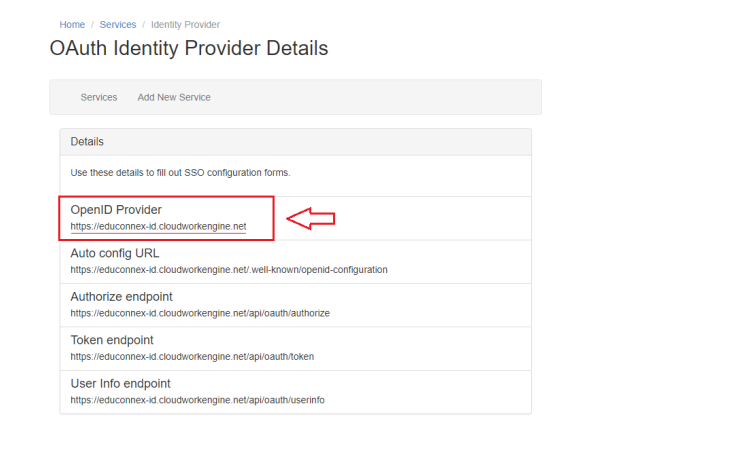
- Send the following 3 values to PTO.


