Difference between revisions of "JSTOR"
Jump to navigation
Jump to search
| (24 intermediate revisions by the same user not shown) | |||
| Line 1: | Line 1: | ||
==SSO Setup with Cloudwork== | ==SSO Setup with Cloudwork== | ||
| − | #In the Cloudwork dashboard, navigate to Single Sign On>Add new service>JSTOR | + | #In the Cloudwork dashboard, navigate to '''Single Sign On'''>'''Add new service'''>'''JSTOR''' |
| − | #Click Confirm | + | #Click '''Confirm''' |
==SSO Setup with JSTOR== | ==SSO Setup with JSTOR== | ||
| − | #In the Cloudwork dashboard, navigate to Single Sign On | + | #In the '''Cloudwork dashboard''', navigate to '''Single Sign On''' |
| − | #Copy the information in Entity | + | #Navigate to '''Identity Provider''' |
| − | #Following the template below, send to JSTOR support email(support@jstor.org) requesting SAML authentication. | + | #Navigate to '''Entity ID''' [[File:Entity_id.PNG|300px|centre|frame|Example of Entity ID]] |
| + | #Copy the information in '''Entity ID''' as this will be sent to JSTOR | ||
| + | #Following the template below, send to JSTOR support email('''support@jstor.org''') requesting SAML authentication. | ||
| − | < | + | |
| + | ===Example Email Template=== | ||
| + | <blockquote> | ||
Hi JSTOR, | Hi JSTOR, | ||
| − | Our | + | Our School '''<School Name>''', is wanting to setup SAML Authentication. |
Below is the information from our Federation, Studentnet: | Below is the information from our Federation, Studentnet: | ||
| − | Federation: Studentnet | + | Federation: Studentnet<br> |
| − | Entity ID: https:// | + | Entity ID: ''<Enter the value copied in step 4 above, from the example image this will be the value https://demo-login.cloudworkengine.net/saml2/idp/metadata.php ''> <br> |
SAML Assertions: eduPersonScopedAffiliation | SAML Assertions: eduPersonScopedAffiliation | ||
| − | </ | + | </blockquote> |
| + | |||
[[Category:Single Sign On Services]] | [[Category:Single Sign On Services]] | ||
Latest revision as of 05:54, 13 October 2021
SSO Setup with Cloudwork
- In the Cloudwork dashboard, navigate to Single Sign On>Add new service>JSTOR
- Click Confirm
SSO Setup with JSTOR
- In the Cloudwork dashboard, navigate to Single Sign On
- Navigate to Identity Provider
- Navigate to Entity ID
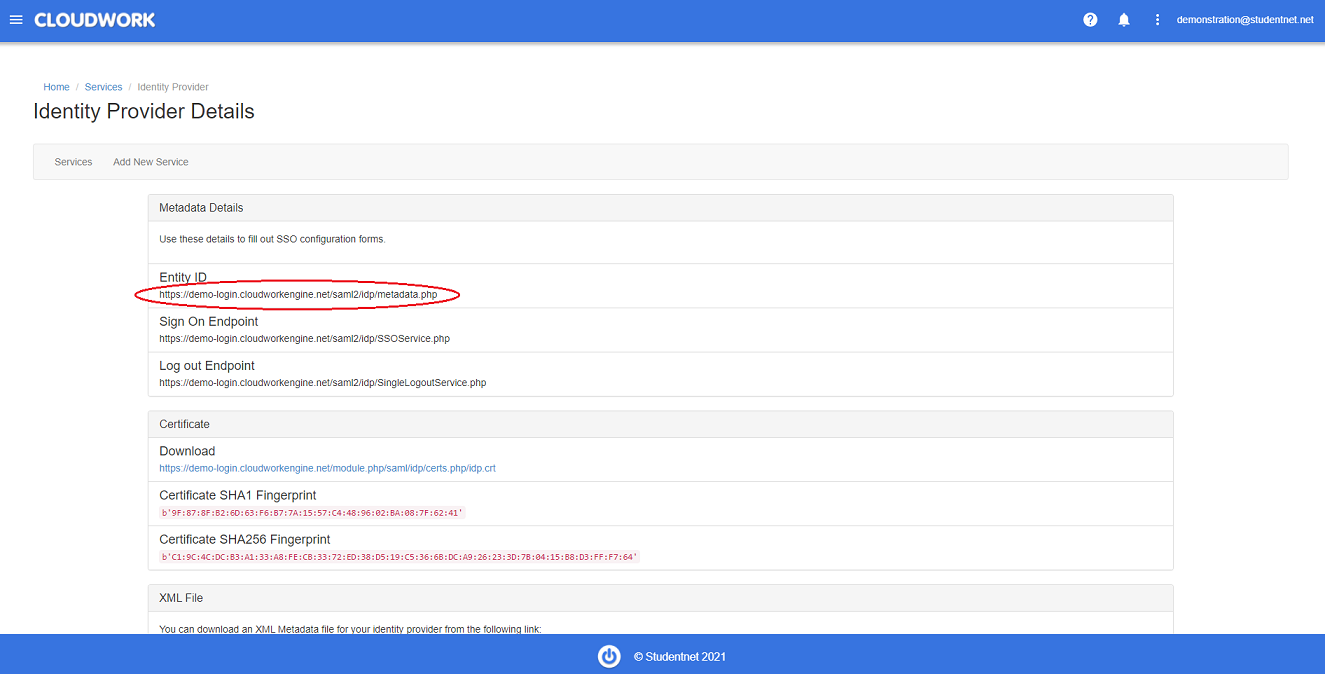 Example of Entity ID
 - Copy the information in Entity ID as this will be sent to JSTOR
- Following the template below, send to JSTOR support email(support@jstor.org) requesting SAML authentication.

Example Email Template
Hi JSTOR,
Our School <School Name>, is wanting to setup SAML Authentication. Below is the information from our Federation, Studentnet:
Federation: Studentnet
Entity ID: <Enter the value copied in step 4 above, from the example image this will be the value https://demo-login.cloudworkengine.net/saml2/idp/metadata.php >
SAML Assertions: eduPersonScopedAffiliation
